

Label
Labels are used to display text in Kivy’s interface.
Overview
The Label widget is used to display non-editable text in a Kivy application. It is primarily employed for presenting static content such as titles, descriptions, instructions, messages, and status indicators throughout the user interface.
The CLabel class extends the functionality of Label by introducing additional properties aligned with the Carbon Design System. These enhancements enable consistent typography, styling, and sizing based on the IBM Plex typeface, ensuring a cohesive and modern visual experience.
Typeface: IBM Plex
Carbon uses the open-source typeface IBM Plex. IBM Plex can be accessed and downloaded from the Plex GitHub Repo.
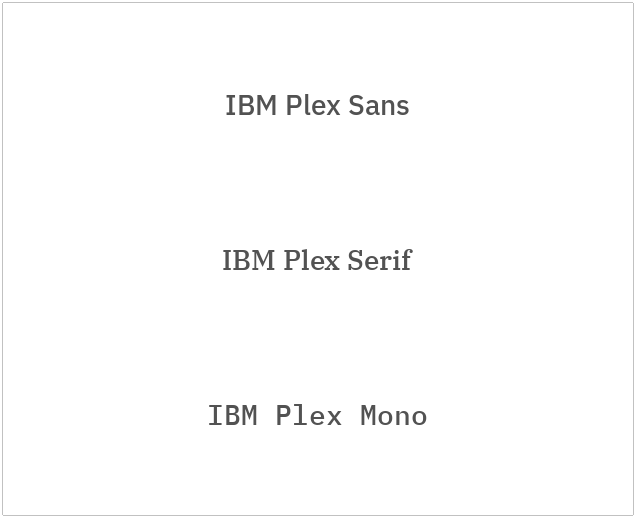
CarbonKivy provides you with three available typefaces:
IBM Plex Sans
IBM Plex Serif
IBM Plex Mono
Use the typeface property to define the token for the typeface.
CScreen:

    CLabel:
        text: "IBM Plex Sans"
        typeface: "IBM Plex Sans"
        halign: "center"
        pos_hint: {"center_y": 0.8}

    CLabel:
        text: "IBM Plex Serif"
        typeface: "IBM Plex Serif"
        halign: "center"
        pos_hint: {"center_y": 0.5}

    CLabel:
        text: "IBM Plex Mono"
        typeface: "IBM Plex Mono"
        halign: "center"
        pos_hint: {"center_y": 0.2}
Style
Typography creates purposeful texture, guiding users to read and understand the hierarchy of information. The right typographic treatment and the controlled usage of type styles helps manage the display of content, keeping it useful, simple, and effective.
Type Sets
Carbon uses a clear naming approach and type tokens to manage typography across complex and layered layouts and patterns, and these tokens sit within two type sets: expressive and productive.
Productive styles are named with a suffix of
_01. e.g.body_01,label_01.Expressive styles are named with a suffix of
_02. e.g.body_02,label_02.
Use the style property to define the token for the font style.
For a complete list of available type tokens refer the below link.
Note
All style tokens are used in Snake case style, in small letters.
See also
CLabel:
    text: "IBM Plex Sans"
    typeface: "IBM Plex Sans"
    style: "heading_04"
    halign: "center"
    pos_hint: {"center_y": 0.8}
Weights
There are 14 available weight style tokens:
Bold
BoldItalic
ExtraLight
ExtraLightItalic
Italic
Light
LightItalic
Medium
MediumItalic
Regular
SemiBold
SemiBoldItalic
Thin
ThinItalic
Use the weight_style property to define the token for the weight style.
CLabel:
    text: "IBM Plex Sans"
    typeface: "IBM Plex Sans"
    style: "heading_04"
    weight_style: "Medium"
    halign: "center"
    pos_hint: {"center_y": 0.8}
Size (Scale)
Font sizes and line heights are attained dynamically based on the style of the label.
You have the priviledge to change the font_size any time.
CarbonKivy provides you with 18 size tokens that can be accessed as variables in kvlang.
plex_12
plex_14
plex_16
plex_18
plex_20
plex_24
plex_28
plex_32
plex_36
plex_42
plex_48
plex_54
plex_60
plex_68
plex_76
plex_84
plex_92
CLabel:
    text: "IBM Plex Sans"
    typeface: "IBM Plex Sans"
    weight_style: "Medium"
    font_size: plex_14
    halign: "center"
    pos_hint: {"center_y": 0.8}
API
- class carbonkivy.uix.label.label.CLabel(*args: Any, **kwargs: Any)[source]
Bases:
AdaptiveBehavior,BackgroundColorBehaviorRectangular,Label- style
OptionProperty(*largs, **kw) Property that represents a string from a predefined list of valid
options.
If the string set in the property is not in the list of valid options (passed at property creation time), a ValueError exception will be raised.
- Parameters:
- default: any valid type in the list of options
Specifies the default value of the property.
- **kwargs: a list of keyword arguments
Should include an options parameter specifying a list (not tuple) of valid options.
For example:
class MyWidget(Widget):
    state = OptionProperty("None", options=["On", "Off", "None"])
- typeface
OptionProperty(*largs, **kw) Property that represents a string from a predefined list of valid
options.
If the string set in the property is not in the list of valid options (passed at property creation time), a ValueError exception will be raised.
- Parameters:
- default: any valid type in the list of options
Specifies the default value of the property.
- **kwargs: a list of keyword arguments
Should include an options parameter specifying a list (not tuple) of valid options.
For example:
class MyWidget(Widget):
    state = OptionProperty("None", options=["On", "Off", "None"])
- update_specs(*args)[source]
- weight_style
OptionProperty(*largs, **kw) Property that represents a string from a predefined list of valid
options.
If the string set in the property is not in the list of valid options (passed at property creation time), a ValueError exception will be raised.
- Parameters:
- default: any valid type in the list of options
Specifies the default value of the property.
- **kwargs: a list of keyword arguments
Should include an options parameter specifying a list (not tuple) of valid options.
For example:
class MyWidget(Widget):
    state = OptionProperty("None", options=["On", "Off", "None"])