

Date picker
Date and time pickers allow users to select a single instance or range of dates and times.
Overview
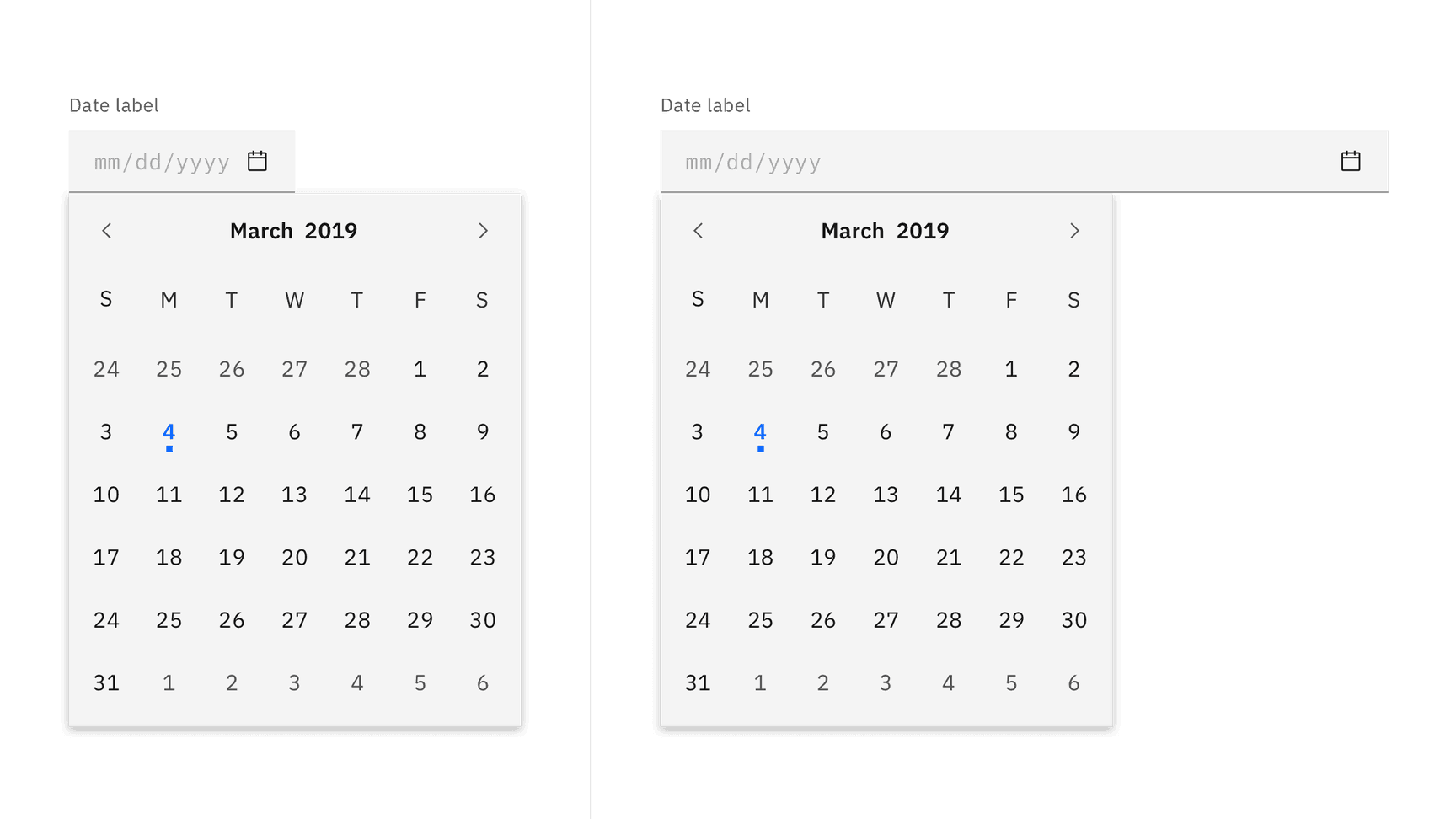
Date pickers allow users to select past, present, or future dates. The kind of date you are requesting from the user will determine which date picker (simple or calendar) is best to use.
Live demo
Note
This live demo contains only a preview of functionality and styles available for this component. Actual widgets may not show the exact same behavior but similar to expected.
...

from carbonkivy.app import CarbonApp
from carbonkivy.uix.datepicker import CDatePicker


class CustomDatePicker(CDatePicker):

    def __init__(self, **kwargs) -> None:
        super(CustomDatePicker, self).__init__(**kwargs)

    def on_selected_date(self, instance, value) -> None:
        self.visibility = False


class MyApp(CarbonApp):

    def __init__(self, *args, **kwargs) -> None:
        super(MyApp, self).__init__(*args, **kwargs)
        self.datepicker = CustomDatePicker()

kvlang = """
CScreen:

    CStackLayout:
        size_hint: [1, 1]
        padding: dp(16)

        CBoxLayout:
            adaptive: [False, True]
            orientation: "vertical"
            padding: [0, dp(32)]

            CTextInputLayout:
                id: datepicker_input

                CTextInput:
                    id: datepicker_textinput
                    readonly: True
                    text: app.datepicker.selected_date.strftime("%d/%m/%y") if app.datepicker.selected_date else ""
                    hint_text: "mm/dd/yy"

                CTextInputTrailingIconButton:
                    icon: "calendar"
                    line_color_focus: app.transparent
                    on_press:
                        app.datepicker.master = datepicker_textinput
                        app.datepicker.visibility = True

<CustomDatePicker>:
    shadow_color: [0, 0, 0, 0.2]
"""

...
Example
See also
API
- class carbonkivy.uix.datepicker.datepicker.CDatePicker(*args: Any, **kwargs: Any)[source]
Bases:
CBoxLayout,ElevationBehavior- current_month[source]
NumericProperty(defaultvalue=0, **kw) Property that represents a numeric value.
It only accepts the int or float numeric data type or a string that can be converted to a number as shown below. For other numeric types use ObjectProperty or use errorhandler to convert it to an int/float.
It does not support numpy numbers so they must be manually converted to int/float. E.g.
widget.num = np.arange(4)[0]will raise an exception. Numpy arrays are not supported at all, even by ObjectProperty because their comparison does not return a bool. But if you must use a Kivy property, use a ObjectProperty withcomparatorset tonp.array_equal. E.g.:>>> class A(EventDispatcher): ... data = ObjectProperty(comparator=np.array_equal) >>> a = A() >>> a.bind(data=print) >>> a.data = np.arange(2) <__main__.A object at 0x000001C839B50208> [0 1] >>> a.data = np.arange(3) <__main__.A object at 0x000001C839B50208> [0 1 2]- Parameters:
- defaultvalue: int or float, defaults to 0
Specifies the default value of the property.
>>> wid = Widget()
>>> wid.x = 42
>>> print(wid.x)
42
>>> wid.x = "plop"
 Traceback (most recent call last):
   File "<stdin>", line 1, in <module>
   File "properties.pyx", line 93, in kivy.properties.Property.__set__
   File "properties.pyx", line 111, in kivy.properties.Property.set
   File "properties.pyx", line 159, in kivy.properties.NumericProperty.check
 ValueError: NumericProperty accept only int/float
Changed in version 1.4.1: NumericProperty can now accept custom text and tuple value to indicate a type, like “in”, “pt”, “px”, “cm”, “mm”, in the format: ‘10pt’ or (10, ‘pt’).
- current_year[source]
NumericProperty(defaultvalue=0, **kw) Property that represents a numeric value.
It only accepts the int or float numeric data type or a string that can be converted to a number as shown below. For other numeric types use ObjectProperty or use errorhandler to convert it to an int/float.
It does not support numpy numbers so they must be manually converted to int/float. E.g.
widget.num = np.arange(4)[0]will raise an exception. Numpy arrays are not supported at all, even by ObjectProperty because their comparison does not return a bool. But if you must use a Kivy property, use a ObjectProperty withcomparatorset tonp.array_equal. E.g.:>>> class A(EventDispatcher): ... data = ObjectProperty(comparator=np.array_equal) >>> a = A() >>> a.bind(data=print) >>> a.data = np.arange(2) <__main__.A object at 0x000001C839B50208> [0 1] >>> a.data = np.arange(3) <__main__.A object at 0x000001C839B50208> [0 1 2]- Parameters:
- defaultvalue: int or float, defaults to 0
Specifies the default value of the property.
>>> wid = Widget()
>>> wid.x = 42
>>> print(wid.x)
42
>>> wid.x = "plop"
 Traceback (most recent call last):
   File "<stdin>", line 1, in <module>
   File "properties.pyx", line 93, in kivy.properties.Property.__set__
   File "properties.pyx", line 111, in kivy.properties.Property.set
   File "properties.pyx", line 159, in kivy.properties.NumericProperty.check
 ValueError: NumericProperty accept only int/float
Changed in version 1.4.1: NumericProperty can now accept custom text and tuple value to indicate a type, like “in”, “pt”, “px”, “cm”, “mm”, in the format: ‘10pt’ or (10, ‘pt’).
- margin[source]
NumericProperty(defaultvalue=0, **kw) Property that represents a numeric value.
It only accepts the int or float numeric data type or a string that can be converted to a number as shown below. For other numeric types use ObjectProperty or use errorhandler to convert it to an int/float.
It does not support numpy numbers so they must be manually converted to int/float. E.g.
widget.num = np.arange(4)[0]will raise an exception. Numpy arrays are not supported at all, even by ObjectProperty because their comparison does not return a bool. But if you must use a Kivy property, use a ObjectProperty withcomparatorset tonp.array_equal. E.g.:>>> class A(EventDispatcher): ... data = ObjectProperty(comparator=np.array_equal) >>> a = A() >>> a.bind(data=print) >>> a.data = np.arange(2) <__main__.A object at 0x000001C839B50208> [0 1] >>> a.data = np.arange(3) <__main__.A object at 0x000001C839B50208> [0 1 2]- Parameters:
- defaultvalue: int or float, defaults to 0
Specifies the default value of the property.
>>> wid = Widget()
>>> wid.x = 42
>>> print(wid.x)
42
>>> wid.x = "plop"
 Traceback (most recent call last):
   File "<stdin>", line 1, in <module>
   File "properties.pyx", line 93, in kivy.properties.Property.__set__
   File "properties.pyx", line 111, in kivy.properties.Property.set
   File "properties.pyx", line 159, in kivy.properties.NumericProperty.check
 ValueError: NumericProperty accept only int/float
Changed in version 1.4.1: NumericProperty can now accept custom text and tuple value to indicate a type, like “in”, “pt”, “px”, “cm”, “mm”, in the format: ‘10pt’ or (10, ‘pt’).
- master[source]
ObjectProperty(defaultvalue=None, rebind=False, **kw) Property that represents a Python object.
- Parameters:
- defaultvalue: object type
Specifies the default value of the property.
- rebind: bool, defaults to False
Whether kv rules using this object as an intermediate attribute in a kv rule, will update the bound property when this object changes.
That is the standard behavior is that if there’s a kv rule
text: self.a.b.c.d, wherea,b, andcare properties withrebindFalseanddis aStringProperty. Then when the rule is applied,textbecomes bound only tod. Ifa,b, orcchange,textstill remains bound tod. Furthermore, if any of them wereNonewhen the rule was initially evaluated, e.g.bwasNone; thentextis bound toband will not become bound todeven whenbis changed to not beNone.By setting
rebindtoTrue, however, the rule will be re-evaluated and all the properties rebound when that intermediate property changes. E.g. in the example above, wheneverbchanges or becomes notNoneif it wasNonebefore,textis evaluated again and becomes rebound tod. The overall result is thattextis now bound to all the properties amonga,b, orcthat haverebindset toTrue.- **kwargs: a list of keyword arguments
- baseclass
If kwargs includes a baseclass argument, this value will be used for validation: isinstance(value, kwargs[‘baseclass’]).
Warning
To mark the property as changed, you must reassign a new python object.
Changed in version 1.9.0: rebind has been introduced.
Changed in version 1.7.0: baseclass parameter added.
- month_name[source]
StringProperty(defaultvalue=u’’, **kw) Property that represents a string value.
- Parameters:
- defaultvalue: string, defaults to ‘’
Specifies the default value of the property.
- on_touch_down(touch)[source]
- on_touch_move(touch)[source]
- on_touch_up(touch)[source]
- pointer[source]
OptionProperty(*largs, **kw) Property that represents a string from a predefined list of valid
options.
If the string set in the property is not in the list of valid options (passed at property creation time), a ValueError exception will be raised.
- Parameters:
- default: any valid type in the list of options
Specifies the default value of the property.
- **kwargs: a list of keyword arguments
Should include an options parameter specifying a list (not tuple) of valid options.
For example:
class MyWidget(Widget):
    state = OptionProperty("None", options=["On", "Off", "None"])
- selected_date[source]
ObjectProperty(defaultvalue=None, rebind=False, **kw) Property that represents a Python object.
- Parameters:
- defaultvalue: object type
Specifies the default value of the property.
- rebind: bool, defaults to False
Whether kv rules using this object as an intermediate attribute in a kv rule, will update the bound property when this object changes.
That is the standard behavior is that if there’s a kv rule
text: self.a.b.c.d, wherea,b, andcare properties withrebindFalseanddis aStringProperty. Then when the rule is applied,textbecomes bound only tod. Ifa,b, orcchange,textstill remains bound tod. Furthermore, if any of them wereNonewhen the rule was initially evaluated, e.g.bwasNone; thentextis bound toband will not become bound todeven whenbis changed to not beNone.By setting
rebindtoTrue, however, the rule will be re-evaluated and all the properties rebound when that intermediate property changes. E.g. in the example above, wheneverbchanges or becomes notNoneif it wasNonebefore,textis evaluated again and becomes rebound tod. The overall result is thattextis now bound to all the properties amonga,b, orcthat haverebindset toTrue.- **kwargs: a list of keyword arguments
- baseclass
If kwargs includes a baseclass argument, this value will be used for validation: isinstance(value, kwargs[‘baseclass’]).
Warning
To mark the property as changed, you must reassign a new python object.
Changed in version 1.9.0: rebind has been introduced.
Changed in version 1.7.0: baseclass parameter added.
- today[source]
ObjectProperty(defaultvalue=None, rebind=False, **kw) Property that represents a Python object.
- Parameters:
- defaultvalue: object type
Specifies the default value of the property.
- rebind: bool, defaults to False
Whether kv rules using this object as an intermediate attribute in a kv rule, will update the bound property when this object changes.
That is the standard behavior is that if there’s a kv rule
text: self.a.b.c.d, wherea,b, andcare properties withrebindFalseanddis aStringProperty. Then when the rule is applied,textbecomes bound only tod. Ifa,b, orcchange,textstill remains bound tod. Furthermore, if any of them wereNonewhen the rule was initially evaluated, e.g.bwasNone; thentextis bound toband will not become bound todeven whenbis changed to not beNone.By setting
rebindtoTrue, however, the rule will be re-evaluated and all the properties rebound when that intermediate property changes. E.g. in the example above, wheneverbchanges or becomes notNoneif it wasNonebefore,textis evaluated again and becomes rebound tod. The overall result is thattextis now bound to all the properties amonga,b, orcthat haverebindset toTrue.- **kwargs: a list of keyword arguments
- baseclass
If kwargs includes a baseclass argument, this value will be used for validation: isinstance(value, kwargs[‘baseclass’]).
Warning
To mark the property as changed, you must reassign a new python object.
Changed in version 1.9.0: rebind has been introduced.
Changed in version 1.7.0: baseclass parameter added.
- update_pos(instance: kivy.uix.widget.Widget, *args) None[source]
- class carbonkivy.uix.datepicker.datepicker.CDatePickerCalendar(*args: Any, **kwargs: Any)[source]
Bases:
CGridLayout- get_calendar_dates(year: str, month: str) None[source]
Get all dates for a 7x7 calendar grid including prev/next month dates
- select_date(selected_date, button)[source]
- selected_button[source]
ObjectProperty(defaultvalue=None, rebind=False, **kw) Property that represents a Python object.
- Parameters:
- defaultvalue: object type
Specifies the default value of the property.
- rebind: bool, defaults to False
Whether kv rules using this object as an intermediate attribute in a kv rule, will update the bound property when this object changes.
That is the standard behavior is that if there’s a kv rule
text: self.a.b.c.d, wherea,b, andcare properties withrebindFalseanddis aStringProperty. Then when the rule is applied,textbecomes bound only tod. Ifa,b, orcchange,textstill remains bound tod. Furthermore, if any of them wereNonewhen the rule was initially evaluated, e.g.bwasNone; thentextis bound toband will not become bound todeven whenbis changed to not beNone.By setting
rebindtoTrue, however, the rule will be re-evaluated and all the properties rebound when that intermediate property changes. E.g. in the example above, wheneverbchanges or becomes notNoneif it wasNonebefore,textis evaluated again and becomes rebound tod. The overall result is thattextis now bound to all the properties amonga,b, orcthat haverebindset toTrue.- **kwargs: a list of keyword arguments
- baseclass
If kwargs includes a baseclass argument, this value will be used for validation: isinstance(value, kwargs[‘baseclass’]).
Warning
To mark the property as changed, you must reassign a new python object.
Changed in version 1.9.0: rebind has been introduced.
Changed in version 1.7.0: baseclass parameter added.
- selected_date[source]
ObjectProperty(defaultvalue=None, rebind=False, **kw) Property that represents a Python object.
- Parameters:
- defaultvalue: object type
Specifies the default value of the property.
- rebind: bool, defaults to False
Whether kv rules using this object as an intermediate attribute in a kv rule, will update the bound property when this object changes.
That is the standard behavior is that if there’s a kv rule
text: self.a.b.c.d, wherea,b, andcare properties withrebindFalseanddis aStringProperty. Then when the rule is applied,textbecomes bound only tod. Ifa,b, orcchange,textstill remains bound tod. Furthermore, if any of them wereNonewhen the rule was initially evaluated, e.g.bwasNone; thentextis bound toband will not become bound todeven whenbis changed to not beNone.By setting
rebindtoTrue, however, the rule will be re-evaluated and all the properties rebound when that intermediate property changes. E.g. in the example above, wheneverbchanges or becomes notNoneif it wasNonebefore,textis evaluated again and becomes rebound tod. The overall result is thattextis now bound to all the properties amonga,b, orcthat haverebindset toTrue.- **kwargs: a list of keyword arguments
- baseclass
If kwargs includes a baseclass argument, this value will be used for validation: isinstance(value, kwargs[‘baseclass’]).
Warning
To mark the property as changed, you must reassign a new python object.
Changed in version 1.9.0: rebind has been introduced.
Changed in version 1.7.0: baseclass parameter added.
- class carbonkivy.uix.datepicker.datepicker.CDatePickerDayButton(*args: Any, **kwargs: Any)[source]
Bases:
CButton,SelectableBehavior- callback_selection[source]
ObjectProperty(defaultvalue=None, rebind=False, **kw) Property that represents a Python object.
- Parameters:
- defaultvalue: object type
Specifies the default value of the property.
- rebind: bool, defaults to False
Whether kv rules using this object as an intermediate attribute in a kv rule, will update the bound property when this object changes.
That is the standard behavior is that if there’s a kv rule
text: self.a.b.c.d, wherea,b, andcare properties withrebindFalseanddis aStringProperty. Then when the rule is applied,textbecomes bound only tod. Ifa,b, orcchange,textstill remains bound tod. Furthermore, if any of them wereNonewhen the rule was initially evaluated, e.g.bwasNone; thentextis bound toband will not become bound todeven whenbis changed to not beNone.By setting
rebindtoTrue, however, the rule will be re-evaluated and all the properties rebound when that intermediate property changes. E.g. in the example above, wheneverbchanges or becomes notNoneif it wasNonebefore,textis evaluated again and becomes rebound tod. The overall result is thattextis now bound to all the properties amonga,b, orcthat haverebindset toTrue.- **kwargs: a list of keyword arguments
- baseclass
If kwargs includes a baseclass argument, this value will be used for validation: isinstance(value, kwargs[‘baseclass’]).
Warning
To mark the property as changed, you must reassign a new python object.
Changed in version 1.9.0: rebind has been introduced.
Changed in version 1.7.0: baseclass parameter added.
- date[source]
ObjectProperty(defaultvalue=None, rebind=False, **kw) Property that represents a Python object.
- Parameters:
- defaultvalue: object type
Specifies the default value of the property.
- rebind: bool, defaults to False
Whether kv rules using this object as an intermediate attribute in a kv rule, will update the bound property when this object changes.
That is the standard behavior is that if there’s a kv rule
text: self.a.b.c.d, wherea,b, andcare properties withrebindFalseanddis aStringProperty. Then when the rule is applied,textbecomes bound only tod. Ifa,b, orcchange,textstill remains bound tod. Furthermore, if any of them wereNonewhen the rule was initially evaluated, e.g.bwasNone; thentextis bound toband will not become bound todeven whenbis changed to not beNone.By setting
rebindtoTrue, however, the rule will be re-evaluated and all the properties rebound when that intermediate property changes. E.g. in the example above, wheneverbchanges or becomes notNoneif it wasNonebefore,textis evaluated again and becomes rebound tod. The overall result is thattextis now bound to all the properties amonga,b, orcthat haverebindset toTrue.- **kwargs: a list of keyword arguments
- baseclass
If kwargs includes a baseclass argument, this value will be used for validation: isinstance(value, kwargs[‘baseclass’]).
Warning
To mark the property as changed, you must reassign a new python object.
Changed in version 1.9.0: rebind has been introduced.
Changed in version 1.7.0: baseclass parameter added.
- day[source]
NumericProperty(defaultvalue=0, **kw) Property that represents a numeric value.
It only accepts the int or float numeric data type or a string that can be converted to a number as shown below. For other numeric types use ObjectProperty or use errorhandler to convert it to an int/float.
It does not support numpy numbers so they must be manually converted to int/float. E.g.
widget.num = np.arange(4)[0]will raise an exception. Numpy arrays are not supported at all, even by ObjectProperty because their comparison does not return a bool. But if you must use a Kivy property, use a ObjectProperty withcomparatorset tonp.array_equal. E.g.:>>> class A(EventDispatcher): ... data = ObjectProperty(comparator=np.array_equal) >>> a = A() >>> a.bind(data=print) >>> a.data = np.arange(2) <__main__.A object at 0x000001C839B50208> [0 1] >>> a.data = np.arange(3) <__main__.A object at 0x000001C839B50208> [0 1 2]- Parameters:
- defaultvalue: int or float, defaults to 0
Specifies the default value of the property.
>>> wid = Widget()
>>> wid.x = 42
>>> print(wid.x)
42
>>> wid.x = "plop"
 Traceback (most recent call last):
   File "<stdin>", line 1, in <module>
   File "properties.pyx", line 93, in kivy.properties.Property.__set__
   File "properties.pyx", line 111, in kivy.properties.Property.set
   File "properties.pyx", line 159, in kivy.properties.NumericProperty.check
 ValueError: NumericProperty accept only int/float
Changed in version 1.4.1: NumericProperty can now accept custom text and tuple value to indicate a type, like “in”, “pt”, “px”, “cm”, “mm”, in the format: ‘10pt’ or (10, ‘pt’).
- is_current_month[source]
BooleanProperty(defaultvalue=True, **kw) Property that represents only a boolean value.
- Parameters:
- defaultvalue: boolean
Specifies the default value of the property.
- is_today[source]
BooleanProperty(defaultvalue=True, **kw) Property that represents only a boolean value.
- Parameters:
- defaultvalue: boolean
Specifies the default value of the property.
- month[source]
NumericProperty(defaultvalue=0, **kw) Property that represents a numeric value.
It only accepts the int or float numeric data type or a string that can be converted to a number as shown below. For other numeric types use ObjectProperty or use errorhandler to convert it to an int/float.
It does not support numpy numbers so they must be manually converted to int/float. E.g.
widget.num = np.arange(4)[0]will raise an exception. Numpy arrays are not supported at all, even by ObjectProperty because their comparison does not return a bool. But if you must use a Kivy property, use a ObjectProperty withcomparatorset tonp.array_equal. E.g.:>>> class A(EventDispatcher): ... data = ObjectProperty(comparator=np.array_equal) >>> a = A() >>> a.bind(data=print) >>> a.data = np.arange(2) <__main__.A object at 0x000001C839B50208> [0 1] >>> a.data = np.arange(3) <__main__.A object at 0x000001C839B50208> [0 1 2]- Parameters:
- defaultvalue: int or float, defaults to 0
Specifies the default value of the property.
>>> wid = Widget()
>>> wid.x = 42
>>> print(wid.x)
42
>>> wid.x = "plop"
 Traceback (most recent call last):
   File "<stdin>", line 1, in <module>
   File "properties.pyx", line 93, in kivy.properties.Property.__set__
   File "properties.pyx", line 111, in kivy.properties.Property.set
   File "properties.pyx", line 159, in kivy.properties.NumericProperty.check
 ValueError: NumericProperty accept only int/float
Changed in version 1.4.1: NumericProperty can now accept custom text and tuple value to indicate a type, like “in”, “pt”, “px”, “cm”, “mm”, in the format: ‘10pt’ or (10, ‘pt’).
- year[source]
NumericProperty(defaultvalue=0, **kw) Property that represents a numeric value.
It only accepts the int or float numeric data type or a string that can be converted to a number as shown below. For other numeric types use ObjectProperty or use errorhandler to convert it to an int/float.
It does not support numpy numbers so they must be manually converted to int/float. E.g.
widget.num = np.arange(4)[0]will raise an exception. Numpy arrays are not supported at all, even by ObjectProperty because their comparison does not return a bool. But if you must use a Kivy property, use a ObjectProperty withcomparatorset tonp.array_equal. E.g.:>>> class A(EventDispatcher): ... data = ObjectProperty(comparator=np.array_equal) >>> a = A() >>> a.bind(data=print) >>> a.data = np.arange(2) <__main__.A object at 0x000001C839B50208> [0 1] >>> a.data = np.arange(3) <__main__.A object at 0x000001C839B50208> [0 1 2]- Parameters:
- defaultvalue: int or float, defaults to 0
Specifies the default value of the property.
>>> wid = Widget()
>>> wid.x = 42
>>> print(wid.x)
42
>>> wid.x = "plop"
 Traceback (most recent call last):
   File "<stdin>", line 1, in <module>
   File "properties.pyx", line 93, in kivy.properties.Property.__set__
   File "properties.pyx", line 111, in kivy.properties.Property.set
   File "properties.pyx", line 159, in kivy.properties.NumericProperty.check
 ValueError: NumericProperty accept only int/float
Changed in version 1.4.1: NumericProperty can now accept custom text and tuple value to indicate a type, like “in”, “pt”, “px”, “cm”, “mm”, in the format: ‘10pt’ or (10, ‘pt’).
- class carbonkivy.uix.datepicker.datepicker.CDatePickerHeader(*args: Any, **kwargs: Any)[source]
Bases:
CBoxLayout