

Modal
Modals focus the user’s attention exclusively on one task or piece of information by using a window that is displayed on top of the page content.
Overview
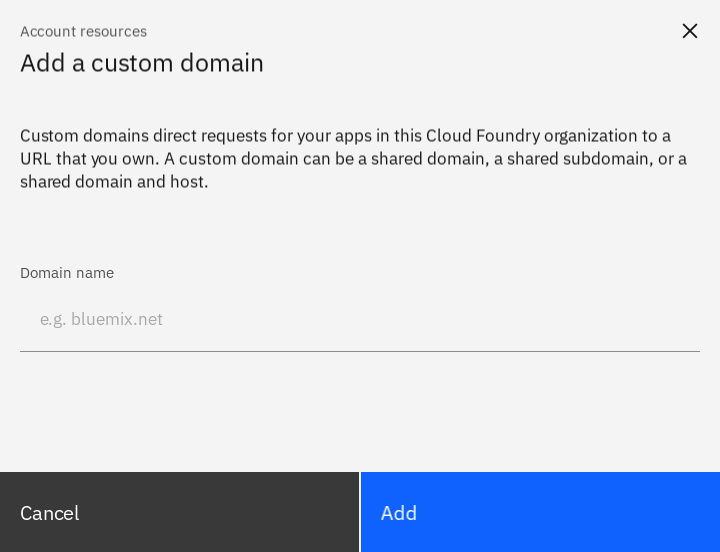
Modals are a type of dialog because it is a conversation between the user and the system. Use a modal to present critical information or request user input that’s needed to complete a user’s workflow. Modals interrupt a user’s workflow for short and non-frequent tasks, such as editing or management tasks. When the modal is open, the user is blocked from the on-page content and can’t return to their previous workflow until the modal task is completed or the user dismisses the modal. While effective when used correctly, modals should be used sparingly to limit disrupting the user. Therefore, if a user needs to repeatably perform a task, consider making the task completable on the main page.
Live demo
Note
This live demo contains only a preview of functionality and styles available for this component. Actual widgets may not show the exact same behavior but similar to expected.
...

from carbonkivy.app import CarbonApp
from carbonkivy.uix.modal import CModal


class DomainModal(CModal):
    pass


class MyApp(CarbonApp) -> None:

    def __init__(self, *args, **kwargs) -> None:
        super(MyApp, self).__init__(*args, **kwargs)
        self.modal = DomainModal()

...
<DomainModal>:
    CModalLayout:

        CModalHeader:
            CModalHeaderLabel:
                text: "Account resources"
            CModalHeaderTitle:
                text: "Add a custom domain"

        CModalBody:
            CModalBodyContent:
                text: "Custom domains direct requests for your apps in this Cloud Foundry organization to a URL that you own. A custom domain can be a shared domain, a shared subdomain, or a shared domain and host."

            CBoxLayout:
                adaptive: [False, True]
                padding: [0, dp(64)]

                CTextInputLayout:
                    CTextInput:
                        hint_text: "e.g. bluemix.net"
                    CTextInputLabel:
                        text: "Domain name"

        CModalFooter:
            CGridLayout:
                cols: 2
                adaptive: [False, True]
                spacing: dp(1)

                CButtonSecondary:
                    text: "Cancel"
                    role: "Extra Large"
                    size_hint_x: 1

                CButtonPrimary:
                    text: "Add"
                    role: "Extra Large"
                    size_hint_x: 1

    CModalCloseButton:
Example
See also
API
- class carbonkivy.uix.modal.modal.CModal(*args: Any, **kwargs: Any)[source]
Bases:
AdaptiveBehavior,DeclarativeBehavior,ModalView- add_widget(widget: kivy.uix.widget.Widget, *args, **kwargs)[source]
- remove_widget(widget, *args, **kwargs)[source]
- class carbonkivy.uix.modal.modal.CModalBody(*args: Any, **kwargs: Any)[source]
Bases:
CStackLayout
- class carbonkivy.uix.modal.modal.CModalCloseButton(*args: Any, **kwargs: Any)[source]
Bases:
UIShellButton
- class carbonkivy.uix.modal.modal.CModalFooter(*args: Any, **kwargs: Any)[source]
Bases:
CStackLayout
- class carbonkivy.uix.modal.modal.CModalHeader(*args: Any, **kwargs: Any)[source]
Bases:
CStackLayout
- class carbonkivy.uix.modal.modal.CModalLayout(*args: Any, **kwargs: Any)[source]
Bases:
CBoxLayout