

Notification
Notifications are messages that communicate information to the user.
Overview
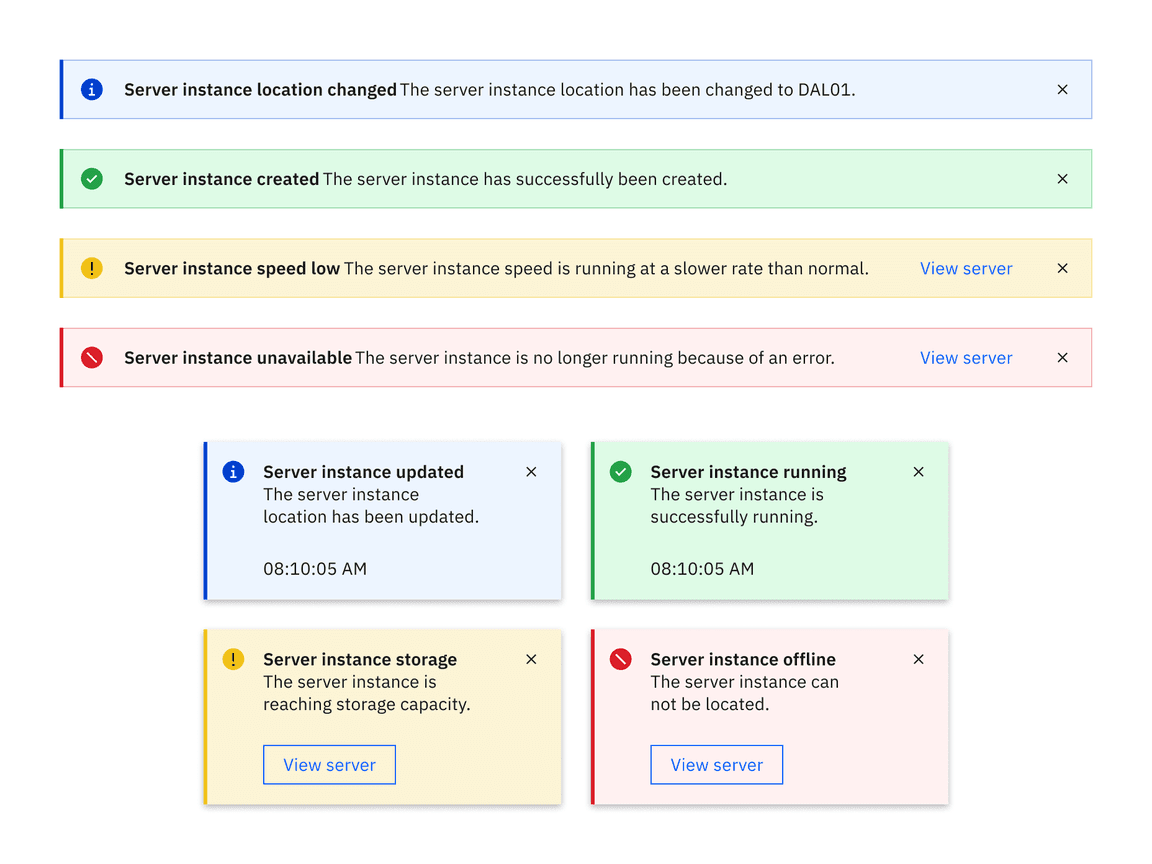
Low contrast
High contrast
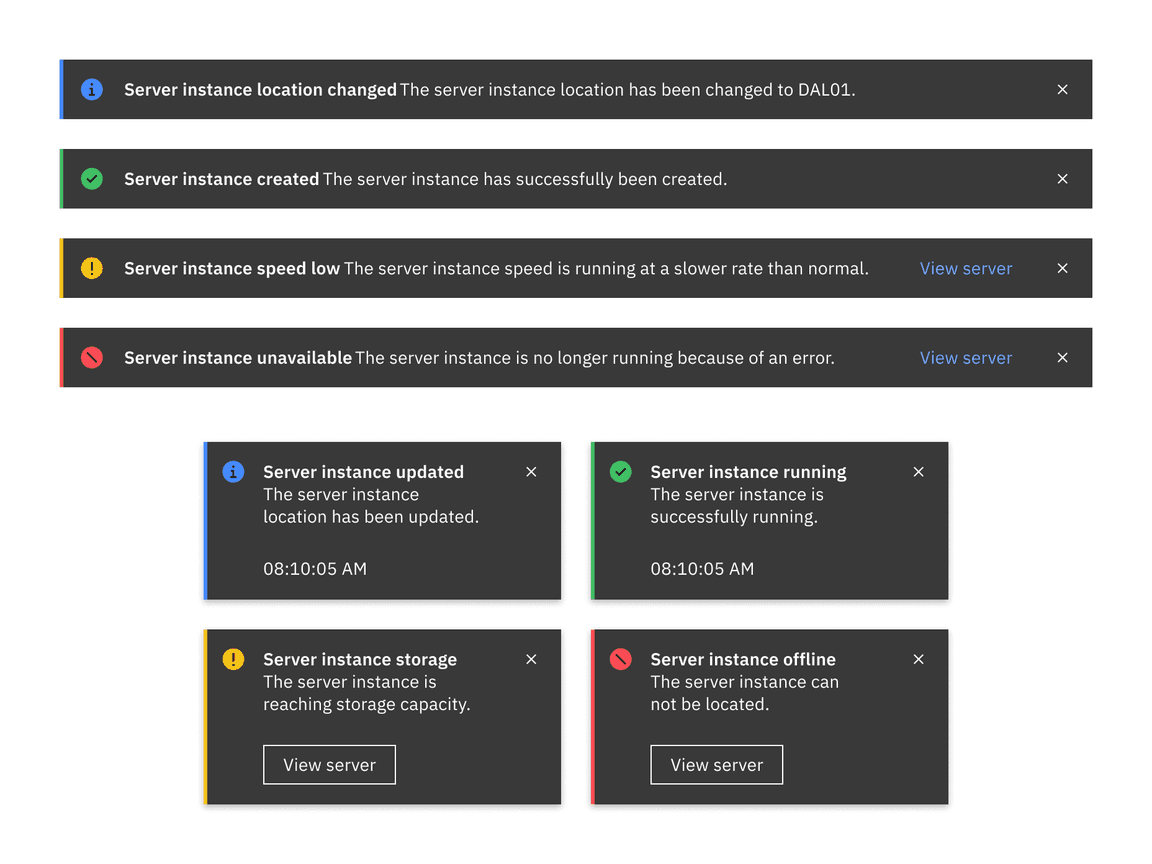
Notifications provide a method for communicating with users and sharing feedback. They come in four statuses which when combined with the right variants make notifications that are relevant, timely, and informative for each use case. Their status signifies the purpose of the information being conveyed and allow you to tailor the disruptiveness of the notification to the specific situation.
Live demo
Note
This live demo contains only a preview of functionality and styles available for this component. Actual widgets may not show the exact same behavior but similar to expected.
CNotificationToast:
    status: "Error"
    title: "Notification title"
    subtitle: "Subtitle text goes here"
    contrast: "High"
    time_caption_enabled: True
Status
There are four available status tokens for a notification:
Error
Info
Success
Warning
Use the status property to define the token for the notification status.
def notify_error(self, *args) -> None:
    self.notification = CNotificationToast(
        title="Server instance unavailable",
        subtitle="The server instance is no longer running because of an error.",
        status="Error", # defaults to "Info"
        time_caption_enabled=True,
    ).open()
Contrast
Two contrast options for notification are available:
Low
High
Use the contrast property to define the token for the notification contrast.
def notify_error(self, *args) -> None:
    self.notification = CNotificationToast(
        title="Server instance unavailable",
        subtitle="The server instance is no longer running because of an error.",
        status="Error",
        contrast="High", # defaults to "Low"
        time_caption_enabled=True,
    ).open()
Variant
Two variants for notification are available:
Inline
Toast
You have three classes for creating a notification of different variants.
CNotification
It serves as a dynamic class for interchanging between variants Inline and Toast in real time whenever required.
Use the variant property to define the token for the notification variant.
def notify_error(self, *args) -> None:
    self.notification = CNotification(
        title="Server instance unavailable",
        subtitle="The server instance is no longer running because of an error.",
        status="Error",
        time_caption_enabled=True,
        variant="Toast"
    ).open()
CNotificationInline
Inline notifications show up in task flows to notify users of the status of an action or system. Inline notifications usually appear at the top of the primary content area or close to the item needing attention
def notify_error(self, *args) -> None:
    self.notification = CNotificationInline(
            title="Server instance unavailable",
            subtitle="The server instance is no longer running because of an error.",
            status="Error",
        ).open()
CNotificationToast
Toast notifications are non-modal, time-based window elements used to display short messages; they usually appear at the top of the screen and disappear after a few seconds.
def notify_error(self, *args) -> None:
    self.notification = CNotificationToast(
        title="Server instance unavailable",
        subtitle="The server instance is no longer running because of an error.",
        status="Error",
        time_caption_enabled=True,
    ).open()
Actionable
Actionable notifications are inline or toast notifications that have interactive elements. Only one action is allowed for each notification, and this action frequently takes users to a flow or page related to the message where they can resolve the notification.
Use the action_button property to define the actionable element for the notification.
Actionable element must inherit from
ButtonBehavior.
from carbonkivy.uix.button import CButtonPrimary

def notify_info(self, *args) -> None:
    self.notification = CNotificationToast(
        title="Server instance updated",
        subtitle="The server instance location has been updated.",
        status="Info",
        action_button=CButtonPrimary(
            text="View Server",
            on_press=self.resolve_notification()
        )
    ).open()

def resolve_notification(self, *args) -> None:
    print("Resolved.")
Example
See also
API
- class carbonkivy.uix.notification.notification.CBaseNotification(*args, **kwargs)[source]
Bases:
AdaptiveBehavior,DeclarativeBehavior,ElevationBehavior,ModalView- action_button[source]
ObjectProperty(defaultvalue=None, rebind=False, **kw) Property that represents a Python object.
- Parameters:
- defaultvalue: object type
Specifies the default value of the property.
- rebind: bool, defaults to False
Whether kv rules using this object as an intermediate attribute in a kv rule, will update the bound property when this object changes.
That is the standard behavior is that if there’s a kv rule
text: self.a.b.c.d, wherea,b, andcare properties withrebindFalseanddis aStringProperty. Then when the rule is applied,textbecomes bound only tod. Ifa,b, orcchange,textstill remains bound tod. Furthermore, if any of them wereNonewhen the rule was initially evaluated, e.g.bwasNone; thentextis bound toband will not become bound todeven whenbis changed to not beNone.By setting
rebindtoTrue, however, the rule will be re-evaluated and all the properties rebound when that intermediate property changes. E.g. in the example above, wheneverbchanges or becomes notNoneif it wasNonebefore,textis evaluated again and becomes rebound tod. The overall result is thattextis now bound to all the properties amonga,b, orcthat haverebindset toTrue.- **kwargs: a list of keyword arguments
- baseclass
If kwargs includes a baseclass argument, this value will be used for validation: isinstance(value, kwargs[‘baseclass’]).
Warning
To mark the property as changed, you must reassign a new python object.
Changed in version 1.9.0: rebind has been introduced.
Changed in version 1.7.0: baseclass parameter added.
- caption[source]
StringProperty(defaultvalue=u’’, **kw) Property that represents a string value.
- Parameters:
- defaultvalue: string, defaults to ‘’
Specifies the default value of the property.
- cnotification_layout[source]
ObjectProperty(defaultvalue=None, rebind=False, **kw) Property that represents a Python object.
- Parameters:
- defaultvalue: object type
Specifies the default value of the property.
- rebind: bool, defaults to False
Whether kv rules using this object as an intermediate attribute in a kv rule, will update the bound property when this object changes.
That is the standard behavior is that if there’s a kv rule
text: self.a.b.c.d, wherea,b, andcare properties withrebindFalseanddis aStringProperty. Then when the rule is applied,textbecomes bound only tod. Ifa,b, orcchange,textstill remains bound tod. Furthermore, if any of them wereNonewhen the rule was initially evaluated, e.g.bwasNone; thentextis bound toband will not become bound todeven whenbis changed to not beNone.By setting
rebindtoTrue, however, the rule will be re-evaluated and all the properties rebound when that intermediate property changes. E.g. in the example above, wheneverbchanges or becomes notNoneif it wasNonebefore,textis evaluated again and becomes rebound tod. The overall result is thattextis now bound to all the properties amonga,b, orcthat haverebindset toTrue.- **kwargs: a list of keyword arguments
- baseclass
If kwargs includes a baseclass argument, this value will be used for validation: isinstance(value, kwargs[‘baseclass’]).
Warning
To mark the property as changed, you must reassign a new python object.
Changed in version 1.9.0: rebind has been introduced.
Changed in version 1.7.0: baseclass parameter added.
- contrast[source]
OptionProperty(*largs, **kw) Property that represents a string from a predefined list of valid
options.
If the string set in the property is not in the list of valid options (passed at property creation time), a ValueError exception will be raised.
- Parameters:
- default: any valid type in the list of options
Specifies the default value of the property.
- **kwargs: a list of keyword arguments
Should include an options parameter specifying a list (not tuple) of valid options.
For example:
class MyWidget(Widget):
    state = OptionProperty("None", options=["On", "Off", "None"])
- icon[source]
StringProperty(defaultvalue=u’’, **kw) Property that represents a string value.
- Parameters:
- defaultvalue: string, defaults to ‘’
Specifies the default value of the property.
- status[source]
OptionProperty(*largs, **kw) Property that represents a string from a predefined list of valid
options.
If the string set in the property is not in the list of valid options (passed at property creation time), a ValueError exception will be raised.
- Parameters:
- default: any valid type in the list of options
Specifies the default value of the property.
- **kwargs: a list of keyword arguments
Should include an options parameter specifying a list (not tuple) of valid options.
For example:
class MyWidget(Widget):
    state = OptionProperty("None", options=["On", "Off", "None"])
- subtitle[source]
StringProperty(defaultvalue=u’’, **kw) Property that represents a string value.
- Parameters:
- defaultvalue: string, defaults to ‘’
Specifies the default value of the property.
- theme_cls[source]
ObjectProperty(defaultvalue=None, rebind=False, **kw) Property that represents a Python object.
- Parameters:
- defaultvalue: object type
Specifies the default value of the property.
- rebind: bool, defaults to False
Whether kv rules using this object as an intermediate attribute in a kv rule, will update the bound property when this object changes.
That is the standard behavior is that if there’s a kv rule
text: self.a.b.c.d, wherea,b, andcare properties withrebindFalseanddis aStringProperty. Then when the rule is applied,textbecomes bound only tod. Ifa,b, orcchange,textstill remains bound tod. Furthermore, if any of them wereNonewhen the rule was initially evaluated, e.g.bwasNone; thentextis bound toband will not become bound todeven whenbis changed to not beNone.By setting
rebindtoTrue, however, the rule will be re-evaluated and all the properties rebound when that intermediate property changes. E.g. in the example above, wheneverbchanges or becomes notNoneif it wasNonebefore,textis evaluated again and becomes rebound tod. The overall result is thattextis now bound to all the properties amonga,b, orcthat haverebindset toTrue.- **kwargs: a list of keyword arguments
- baseclass
If kwargs includes a baseclass argument, this value will be used for validation: isinstance(value, kwargs[‘baseclass’]).
Warning
To mark the property as changed, you must reassign a new python object.
Changed in version 1.9.0: rebind has been introduced.
Changed in version 1.7.0: baseclass parameter added.
- class carbonkivy.uix.notification.notification.CNotification(*args, **kwargs)[source]
Bases:
CBaseNotification- variant[source]
OptionProperty(*largs, **kw) Property that represents a string from a predefined list of valid
options.
If the string set in the property is not in the list of valid options (passed at property creation time), a ValueError exception will be raised.
- Parameters:
- default: any valid type in the list of options
Specifies the default value of the property.
- **kwargs: a list of keyword arguments
Should include an options parameter specifying a list (not tuple) of valid options.
For example:
class MyWidget(Widget):
    state = OptionProperty("None", options=["On", "Off", "None"])
- class carbonkivy.uix.notification.notification.CNotificationCaption(*args: Any, **kwargs: Any)[source]
Bases:
CLabel
- class carbonkivy.uix.notification.notification.CNotificationCloseButton(*args: Any, **kwargs: Any)[source]
Bases:
CButton
- class carbonkivy.uix.notification.notification.CNotificationInline(*args, **kwargs)[source]
Bases:
CBaseNotification
- class carbonkivy.uix.notification.notification.CNotificationToast(*args, **kwargs)[source]
Bases:
CBaseNotification