

Grid Layout
The CGridLayout class inherits from GridLayout and extends its functionality by introducing additional properties.
For instance, let’s see an example of how CGridLayout enhances control of background color compared to standard one.
CGridLayout:
    bg_color: app.background_hover
GridLayout:
    canvas.before:
        Color:
            rgba: app.background_hover
        SmoothRectangle:
            pos: self.pos
            size: self.size
Responsive Behavior
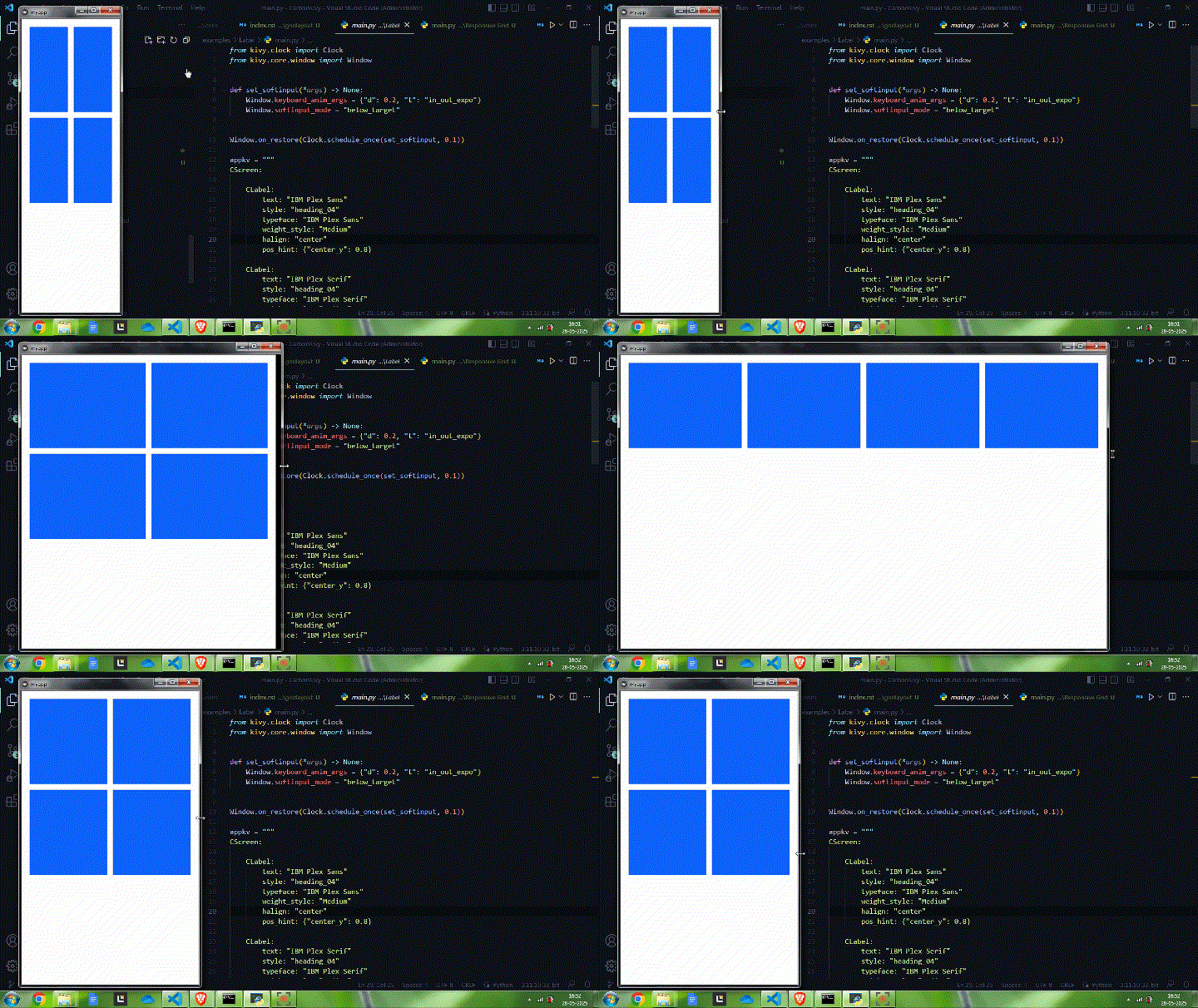
Use the responsive property to enable or disable the responsive behavior of the layout.
There are three tokens for responsive attribute:
cols
rows
both
Use the responsive_attr property to define the responsive attribute for the responsive behavior of the layout.
Usage
With any responsive attribute you have access to its minimum and maximum values.
Scaling - Breakpoints
Use the scale_width and scale_height properties to define the breakpoints for the responsive behavior of the layout.
Example
Let’s take an example of a grid layout with minimum columns 2, maximum columns 4 and responsive attribute as cols (default) with a breakpoint of dp(200).
CGridLayout:
    responsive: True
    min_cols: 2
    cols: 2 # default number of cols on start
    max_cols: 4
    scale_width: dp(200)
    adaptive: [False, True]

    CBoxLayout:
        orientation: 'vertical'
        size_hint: 1, None
        height: dp(300)
        bg_color: app.interactive

    CBoxLayout:
        orientation: 'vertical'
        size_hint: 1, None
        height: dp(300)
        bg_color: app.interactive

    CBoxLayout:
        orientation: 'vertical'
        size_hint: 1, None
        height: dp(300)
        bg_color: app.interactive

    CBoxLayout:
        orientation: 'vertical'
        size_hint: 1, None
        height: dp(300)
        bg_color: app.interactive
API
- class carbonkivy.uix.gridlayout.gridlayout.CGridLayout(*args: Any, **kwargs: Any)[source]
Bases:
AdaptiveBehavior,BackgroundColorBehaviorRectangular,DeclarativeBehavior,GridLayout- max_cols[source]
Maximum number of columns in the grid.
- max_rows[source]
Maximum number of rows in the grid.
- min_cols[source]
Minimum number of columns in the grid.
- min_rows[source]
Minimum number of rows in the grid.
- responsive[source]
Wether to show responsive behavior or not.
- responsive_attr[source]
The attribute of the grid for responsive behavior.
- scale_height[source]
Height of a single element.
- scale_width[source]
Width of a single element.