

Icons
Icons are visual symbols used to represent ideas, objects, or actions. They communicate messages at a glance, afford interactivity, and draw attention to important information.
Overview
See also
The CIcon class provides you with the ability to display available Carbon Design Icons.
Access the icon font here. This Icon font is managed by Kartavya Shukla.
For a complete dictionary of available glyph codes visit CarbonKivy Glyph Codes Dictionary.
CIcon:
    icon: "shopping--cart"
    color: app.interactive
    font_size: plex_16
Example
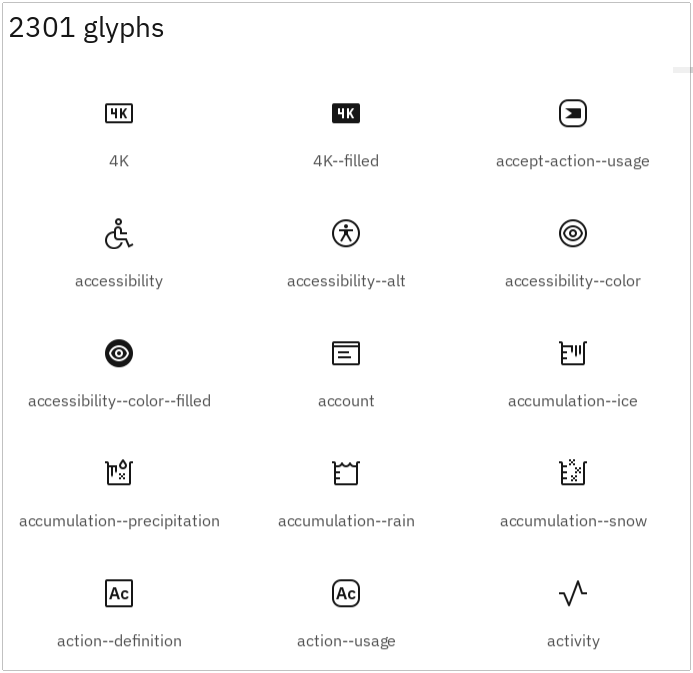
Run the below code for a full-fledged running example with all available glyphs.
from kivy.clock import Clock
from kivy.core.window import Window


def set_softinput(*args) -> None:
    Window.keyboard_anim_args = {"d": 0.2, "t": "in_out_expo"}
    Window.softinput_mode = "below_target"


Window.on_restore(Clock.schedule_once(set_softinput, 0.1))

appkv = """
CScreen:

    CLabel:
        text: f"{app.icon_count} glyphs"
        color: app.text_primary
        style: "heading_04"
        padding: dp(8)
        pos_hint: {"top": 1}

    IconView:
        size_hint: 1, 0.9
        viewclass: "MyIcon"
        bar_width: "20dp"
        do_scroll_x: False
        scroll_type: ['bars', 'content']

        RecycleGridLayout:
            cols: 2
            default_size: None, None
            default_size_hint: 1, None
            size_hint: 1, None
            height: self.minimum_height
            padding: [dp(16), dp(16), dp(16), dp(16)]
            spacing: dp(20)

<MyIcon@CAnchorLayout>:
    anchor_x: 'center'
    anchor_y: 'center'
    size_hint: 1, 1
    text: ""
    icon: ""

    CBoxLayout:
        spacing: "20dp"
        orientation: "vertical"
        adaptive: [False, True]
        CIcon:
            multiline: True
            icon: root.icon
            font_size: plex_32
            pos_hint: {'center_x': 0.5}
        CLabel:
            text: root.text
            halign: "center"
"""

from kivy.lang import Builder
from kivy.uix.recycleview import RecycleView

from carbonkivy.app import CarbonApp
from carbonkivy.theme.icons import ibm_icons
from carbonkivy.uix.screen import CScreen


class IconView(RecycleView):
    def __init__(self, **kwargs):
        super().__init__(**kwargs)
        self.data = []
        for icons in ibm_icons.keys():
            self.data.extend([{"icon": icons, "text": icons}])


class myapp(CarbonApp):
    def __init__(self, *args, **kwargs):
        super(myapp, self).__init__(*args, **kwargs)
        self.icon_count = len(ibm_icons.keys())

    def build(self) -> CScreen:
        screen = Builder.load_string(appkv)
        return screen


if __name__ == "__main__":
    myapp().run()
API
- class carbonkivy.uix.icon.icon.CBaseIcon(*args: Any, **kwargs: Any)[source]
Bases:
AdaptiveBehavior,DeclarativeBehavior,LabelThe CBaseIcon class inherits from Label to display icons from IBM’s icon library using the generated icon font.
- font_name = '/home/docs/checkouts/readthedocs.org/user_builds/carbonkivy/envs/latest/lib/python3.13/site-packages/carbonkivy/data/Icons/carbondesignicons.ttf'[source]
Filename of the font to use. The path can be absolute or relative. Relative paths are resolved by the
resource_find()function.Warning
Depending of your text provider, the font file can be ignored. However, you can mostly use this without problems.
If the font used lacks the glyphs for the particular language/symbols you are using, you will see ‘[]’ blank box characters instead of the actual glyphs. The solution is to use a font that has the glyphs you need to display. For example, to display
 , use a font such
as freesans.ttf that has the glyph.
, use a font such
as freesans.ttf that has the glyph.font_nameis aStringPropertyand defaults to ‘Roboto’. This value is taken fromConfig.
- icon[source]
OptionProperty(*largs, **kw) Property that represents a string from a predefined list of valid
options.
If the string set in the property is not in the list of valid options (passed at property creation time), a ValueError exception will be raised.
- Parameters:
- default: any valid type in the list of options
Specifies the default value of the property.
- **kwargs: a list of keyword arguments
Should include an options parameter specifying a list (not tuple) of valid options.
For example:
class MyWidget(Widget):
    state = OptionProperty("None", options=["On", "Off", "None"])
- class carbonkivy.uix.icon.icon.CIcon(*args: Any, **kwargs: Any)[source]
Bases:
BackgroundColorBehaviorRectangular,CBaseIcon- on_kv_post(base_widget)[source]
- class carbonkivy.uix.icon.icon.CIconCircular(*args: Any, **kwargs: Any)[source]
Bases:
BackgroundColorBehaviorCircular,CBaseIcon- on_kv_post(base_widget)[source]